Host-Only:
Guest(VM) 和 Host(PC) 以各自的虛擬網路卡連結, 即 VM 須經由 PC 存取外部網路資源
NAT:
Virtual Box 預設的網路模式
Host-Only:
Guest(VM) 和 Host(PC) 以各自的虛擬網路卡連結, 即 VM 須經由 PC 存取外部網路資源
NAT:
Virtual Box 預設的網路模式
1.「 During the whole of a dull,dark soundless day
在那年秋季枯燥,灰暗而瞑寂的某個長日裡
In the autumn of that year, when the clouds hung oppressively low in heaven
沉重的雲層低懸於天穹之上
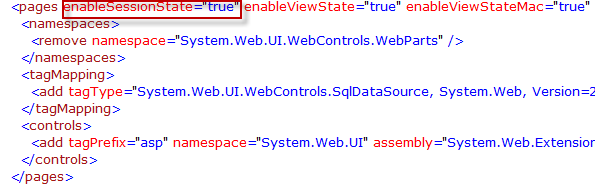
預設SharePoint 2010 並沒有啟用Session機制,因此如果客製化的User Control或是ApplicationPage有用到Session的話,那麼必須要啟用SharePoint 2010中的Session機制,而啟用的方式就是修改web.config中的相關設定。
總共有兩個設定要修改:
![2009-11-14 下午 02-53-18_thumb[1]](http://files.dotblogs.com.tw/yc421206/0911/SharePointWebPartSharePointWebPart_EB13/2009-11-14%20%E4%B8%8B%E5%8D%88%2002-53-18_thumb%5B1%5D_b63b8a0c-4fde-4e14-9774-d2ddadc91656.png "2009-11-14 下午 02-53-18_thumb[1]")
當Sharepoint安裝好之後,便可以開發一客制化的功能,當我們選擇用Web Part開發後,
1.安裝開發工具[.Net Tools] Windows SharePoint Services 3.0 Tools 方案產生器,記得要安裝對的語言及版本,否則將不能使用。(沒有裝SharePoint也不能裝工具)
2.開啟VS新增專案,我們可以發現多了SharePoint,開發樣板。
3.下圖為新開的Web Part專案,我們可以發現WebPart資料夾,這個是編譯後將會是Web Part的名稱,但我不想叫WebPart1,且發佈的Web Part名稱不能重覆。
所以我們必須要砍了它,砍了資料夾VS會幫我們做一些設定,若你砍了資料夾裡的CS檔,這些工作必須要自己來。

一、SmartPart的安裝部署方法:
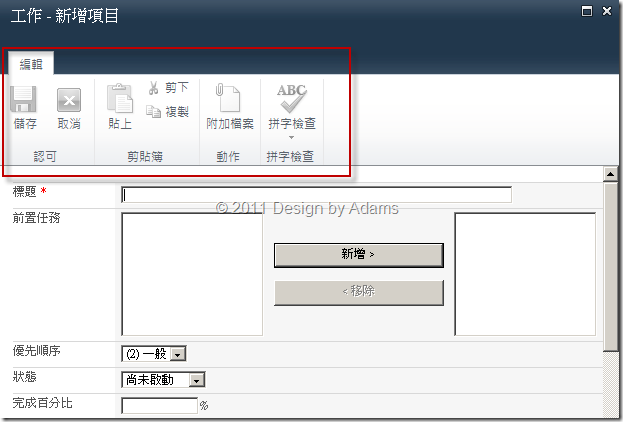
基本上,SharePoint 2010網站中的頁面(Home.aspx or Default.aspx…等等)以及頁面中操作時所彈跳出的Dialog視窗所套用的master都是一樣的,也就是:v4.master,而在v4.master中用來控管Ribbon區塊的是一個div區段:
<div id="s4-ribbonrow" class="s4-pr s4-ribbonrowhidetitle">
… …
網站預設的Dialog視窗是有Ribbon,如下圖所示:

相信不少人都希望把SharePoint網站內置的那個頂部導航菜單,換成自己希望的樣式。由於SharePoint 2007/2010的網站導航基本上基於標準的ASP.NET SiteMap模型,所以只要你對ASP.NET SiteMap有一些瞭解,就能創建一個自定義的導航菜單。
在開始之前,讓我們先從網上隨便找一個樣子比較cool的菜單控件。在下面的示例中,我會選擇使用Smooth Navigation Menu這個jQuery控件,來渲染出SharePoint網站的頂部導航菜單。將Smooth Navigation Menu控件相關的.js、.css、.gif文件統統下載下來,我們將把它們都放進SharePoint項目中。
打開Visual Studio 2010,創建一個SharePoint 2010項目(我最喜歡的項目模板是「空白SharePoint項目」),在項目中添加一個映射文件夾,來存放Smooth Navigation Menu控件所需的所有文件。我選擇在Layouts文件夾中創建一個SmoothNavMenu子文件夾來存放這些文件,如下圖所示:
接下來開始創建自定義導航菜單。實際上,我們有很多方法可以用來創建自定義導航菜單。例如,我們可以選擇以自定義控件的方式,來創建一個自定義導航菜單。由於在這個示例中,我們使用的是一個jQuery插件來實現界面渲染,所以選擇以用戶控件(.ascx)的方式來創建自定義導航菜單,似乎是一個更好的選擇。
在Visual Studio 2010中,向項目中添加一個用戶控件,為其命名為SmoothNavMenu.ascx。
HTML:
<asp:FileUpload ID="FileUpload1" runat="server" Width="100%"
onchange="return checkFileExtension(this);" />
# 將FileUpload元件新增至<body></body>之間
JavaScript:
<script language="javascript"> //傳入的elem必須是檔案的完整路徑 function checkFileExtension(elem) { var filePath = elem.value;if (filePath.indexOf('.') == -1)
{remove(elem);
alert('不正確的副檔名格式');return false;
}
var validExtensions = new Array();
var ext = filePath.substring(filePath.lastIndexOf('.') + 1).toLowerCase();
validExtensions[0] = 'tif'; validExtensions[1] = 'tiff'; validExtensions[2] = 'pdf';for (var i = 0; i < validExtensions.length; i++)
{ if (ext == validExtensions[i])return true;
}
remove(elem);
alert('不正確的副檔名格式: ' + ext.toUpperCase());return false;
}
function remove(control) { var who = control; who.value = ""; var who2 = who.cloneNode(false);
who2.onchange = who.onchange;
who.parentNode.replaceChild(who2, who);
}
</script>
private void richTextBox1_TextChanged(object sender, EventArgs e)
{richTextBox1.SelectionStart = richTextBox1.TextLength;
richTextBox1.ScrollToCaret();
}

Sysinternals 是一家很特別的公司,自從被微軟收購後,仍致力於開發很多實用且免費的小軟體,而最新力作就是P2V 工具(Physical-to-Virtual 實體轉虛擬 )- Disk2vhd。
Disk2vhd 能將實體硬碟轉成VHD 虛擬硬碟格式,然後掛載於Virtual PC 或Hyper-V 上使用。承如過去這家公司的風格,軟體解開來就只有三個檔案:chm說明檔、主程式、授權聲明,而且還是免安裝綠色版。
執行方式也很簡單,只要打開該軟體,然後勾選欲轉成vhd 的磁碟,按下[Create] 後就收工了。由於是透過VSS 的方式進行,因此可以即時線上轉換;所以目前可支援Windows XP SP2、Windows Server 2003 SP1 及其後期的作業系統,並包含x64版本。